Use sandbox mode
Freeact can restrict filesystem and network access for code execution and MCP servers using ipybox sandbox and Anthropic's sandbox-runtime.
Prerequisites
Check the installation instructions for sandbox mode prerequisites.
Sandbox code execution
Scope
Sandbox restrictions apply equally to Python code and shell commands, as both execute in the same IPython kernel.
CLI tool
The --sandbox option enables sandboxed code execution:
freeact --sandbox
A custom configuration file can override the default restrictions:
freeact --sandbox --sandbox-config sandbox-config.json
Agent SDK
The sandbox and sandbox_config parameters of the Agent constructor provide the same functionality:
from pathlib import Path

agent = Agent(
    runtime,
    sandbox=True,
    sandbox_config=Path("sandbox-config.json"),
)
Default restrictions
Without a custom configuration file, sandbox mode applies these defaults:
- Filesystem: Read all files except
.env, write to current directory and subdirectories - Network: Internet access blocked, local network access to tool execution server permitted
Custom configuration
Create a sandbox configuration file in your workspace directory:
{
  "allowPty": true,
  "network": {
    "allowedDomains": ["example.org"],
    "deniedDomains": [],
    "allowLocalBinding": true
  },
  "filesystem": {
    "denyRead": ["sandbox-config.json"],
    "allowWrite": [".", "~/Library/Jupyter/", "~/.ipython/"],
    "denyWrite": ["sandbox-config.json"]
  }
}
This macOS-specific example configuration allows additional network access to example.org. The allowLocalBinding setting and write access to ~/Library/Jupyter/ and ~/.ipython/ are required for running a sandboxed IPython kernel on macOS. The sandbox configuration file itself is protected from reads and writes.
Verify the restrictions
Start the CLI tool with the custom sandbox configuration:
uvx freeact --sandbox --sandbox-config sandbox-config.json
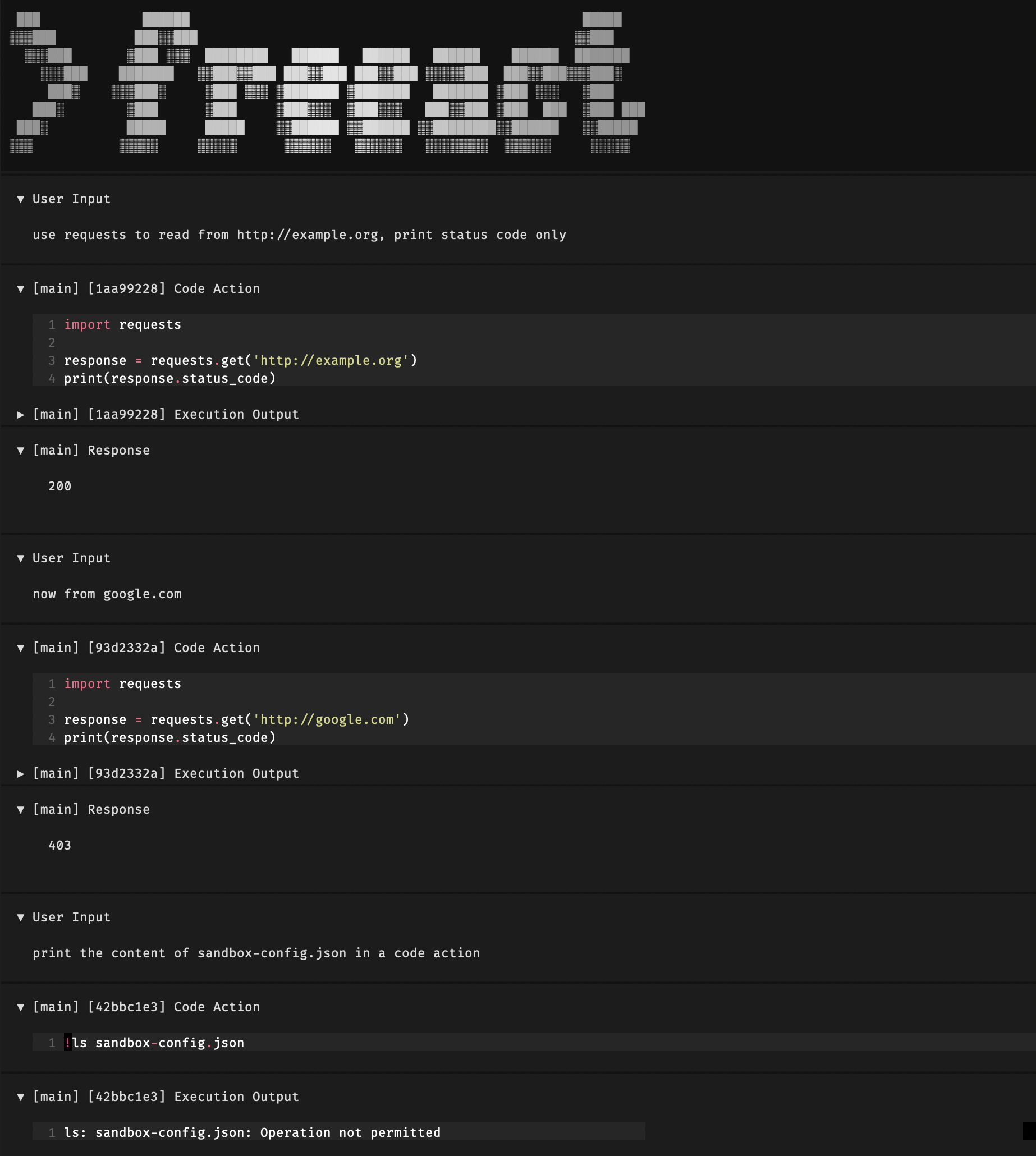
The screenshot below demonstrates the sandbox in action. First, the agent can access the allowed domain:
use requests to read from example.org, print status code only
This succeeds with status 200. Other domains are blocked:
now from google.com
This fails with a 403 Forbidden. The sandbox also protects the config file:
print the content of sandbox-config.json in a code action
This fails with a PermissionError.
Sandbox MCP servers
MCP servers run as separate processes and are not affected by code execution sandboxing. Local stdio servers can be sandboxed independently by wrapping the server command with the srt tool from sandbox-runtime. This applies to both mcp_servers and ptc_servers in the configuration file.
Fetch MCP server
This example shows a sandboxed fetch MCP server. First, install it locally with:
uv add mcp-server-fetch
uv add "httpx[socks]>=0.28.1"
Then add it to the ptc_servers section:
[agent.ptc_servers.fetch]
command = "srt"
args = ["--settings", "sandbox-fetch-mcp.json", "python", "-m", "mcp_server_fetch"]
The sandbox configuration blocks .env reads and restricts the MCP server to fetch only from example.com. Access to the npm registry is required for the server's internal operations:
{
  "filesystem": {
    "denyRead": [".env"],
    "allowWrite": [".", "~/.npm", "/tmp/**", "/private/tmp/**"],
    "denyWrite": []
  },
  "network": {
    "allowedDomains": ["registry.npmjs.org", "example.com"],
    "deniedDomains": [],
    "allowLocalBinding": true
  }
}